 NOOP App Guide

Quick steps
- Download the NOOP APK and tap Open.
- If Android asks, tap Settings and turn on Allow from this source.
- Tap Install. If Play Protect warns you, tap More details → Install anyway (other fixes).
- Open NOOP, tap Begin, and allow Nearby devices and notifications.
- Allow NOOP to run in the background, then pair your strap.
Before you start
- Android Android 8.0 or newer, with Bluetooth. Check yours in Settings → About phone → Android version.
- About 25 MB of free space for the APK, and more for your data over time.
- Your WHOOP strap, charged.
- Your WHOOP history (optional). If you'd like it in NOOP, request your data export from WHOOP now. See Import your WHOOP data.
The pictures below are drawings of each screen, made to match Android's wording. Your phone's colours and layout may look a little different, especially on Samsung and Xiaomi phones, but the button names are the same.
Download the NOOP APK
Download NOOP 12.0.0 (Android)21.4 MB
The file is NOOP-android-v12.0.0.apk, straight from NOOP's GitHub releases. It saves to your Downloads folder.
Chrome may ask whether you want to keep the file, because any APK can harm a phone. Tap Download anyway.
How to install the NOOP APK
Open the downloaded file
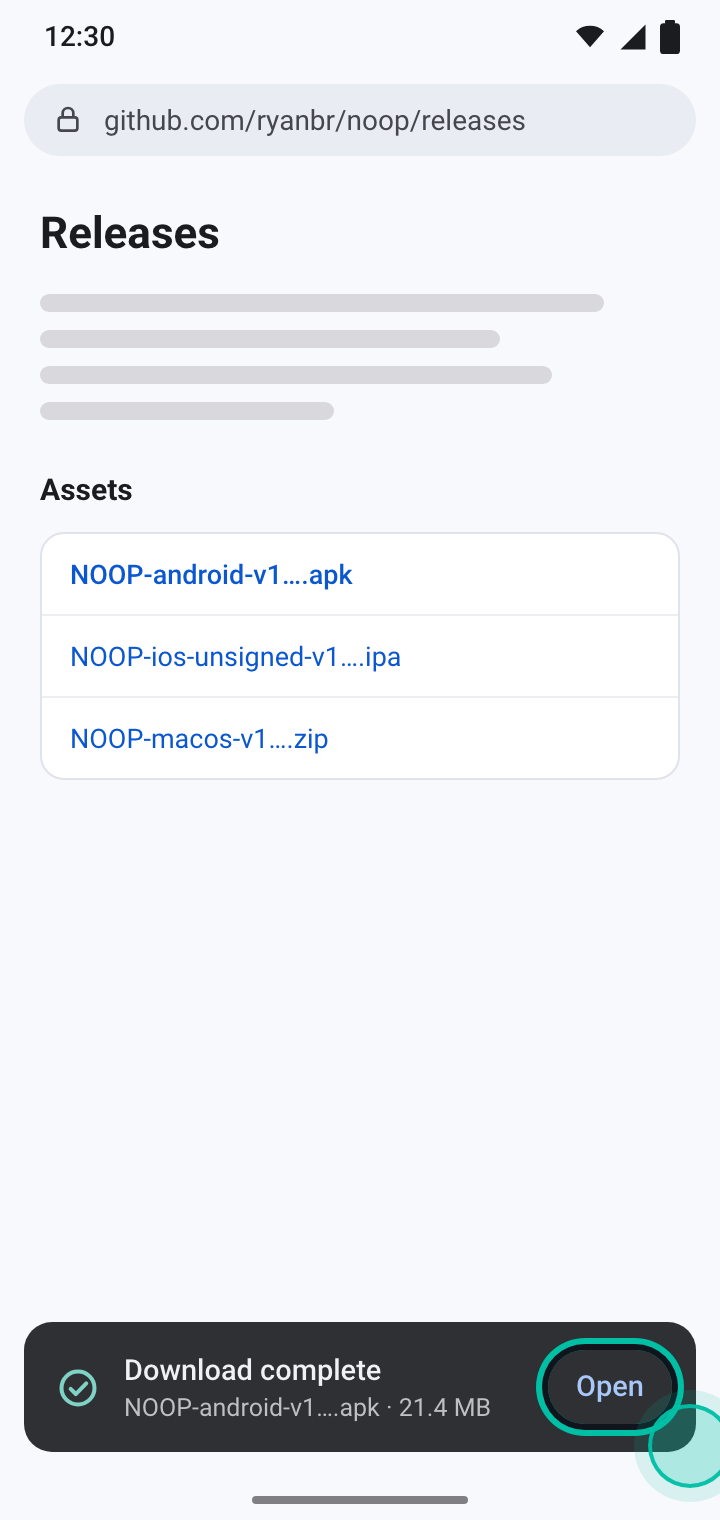
When the download finishes, tap Open in the message at the bottom of the screen. Missed it? Open the Files app (or My Files on Samsung), go to Downloads and tap the NOOP APK.
Let your browser install apps
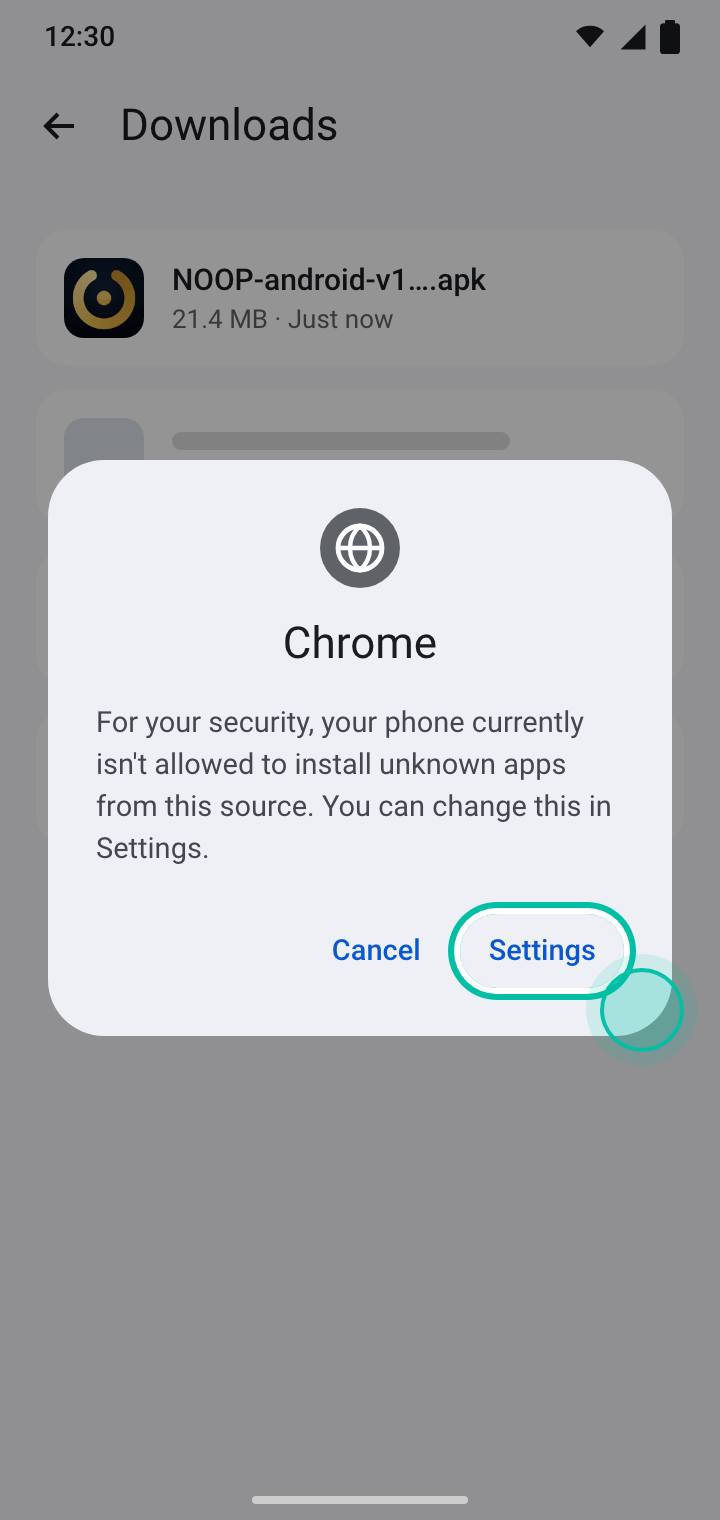
The first time you install an app from outside the Play Store, Android stops and explains that your browser isn't allowed to install apps. Tap Settings.
Turn on Allow from this source
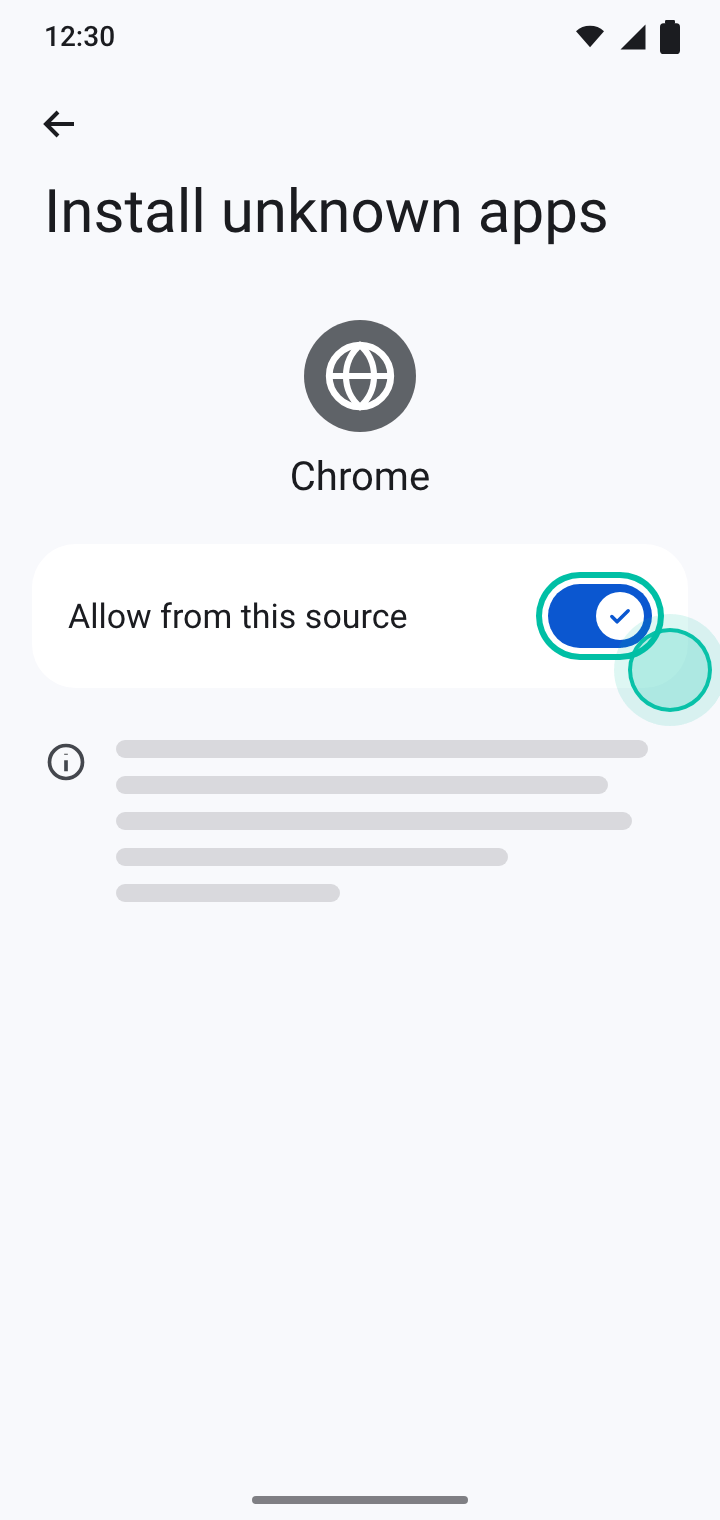
Turn on Allow from this source, then tap the back arrow. You only have to do this once for each browser or file app.
Tap Install
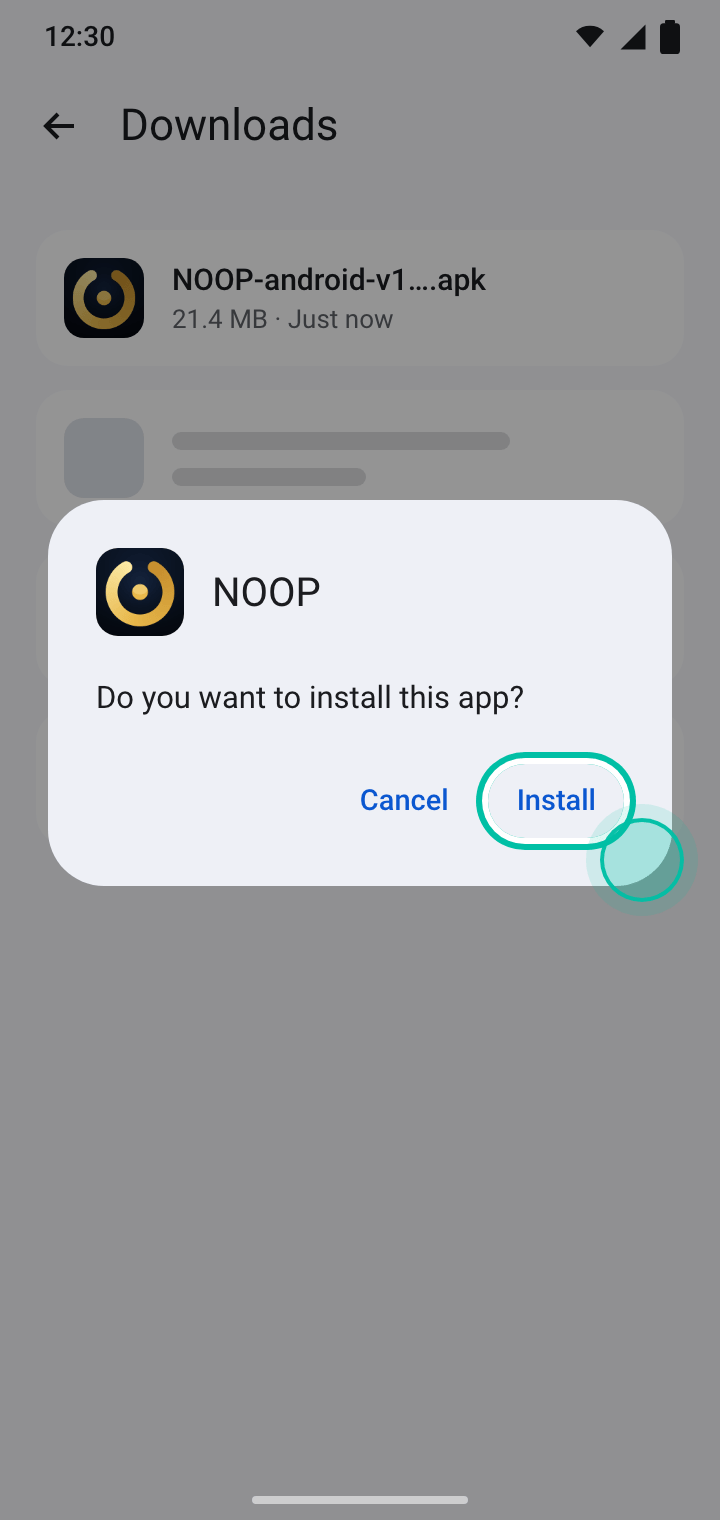
Android asks whether you want to install NOOP. Tap Install and wait a few seconds. If Play Protect steps in, follow the next section.
When it's done, tap Open, or find NOOP in your app drawer.
If Play Protect blocks NOOP
Google Play Protect checks apps installed from outside the Play Store. Because NOOP doesn't carry a Play signature, Play Protect may warn you or block the install. This happens most often on Pixel phones and recent Android versions. Nothing is wrong with the file. Try these fixes in order.
Tap More details, then Install anyway
On the Unsafe app blocked warning, tap More details to open the hidden options, then tap Install anyway.
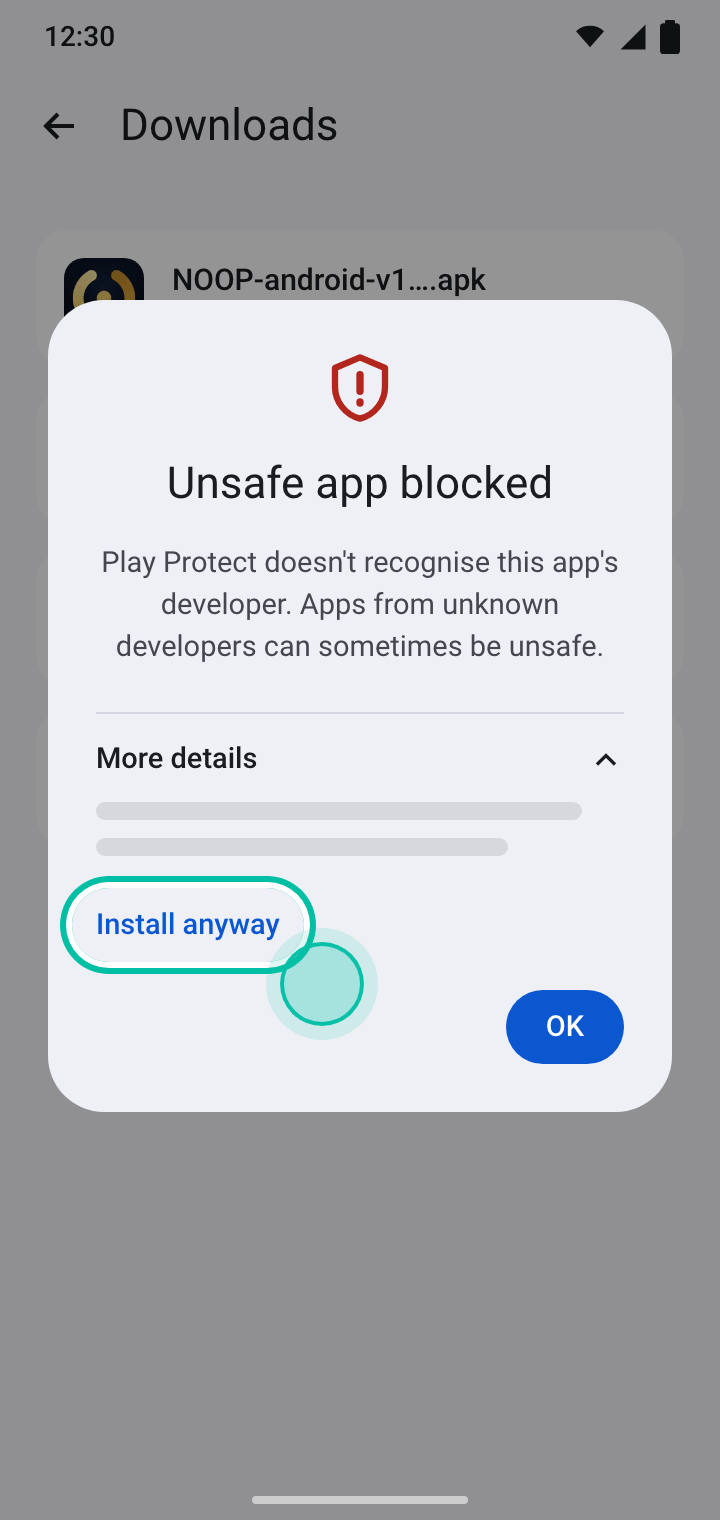
If you see App scan recommended instead, tap Install without scanning, or let it scan and then install.
No Install anyway button? Allow the source in Settings
The button can disappear, for example after you've installed and removed NOOP before. Allow the install from Settings instead:
- Open Settings → Apps → Special app access → Install unknown apps. On Samsung it's Settings → Apps → ⋮ → Special access → Install unknown apps.
- Pick the browser or file app you're installing from.
- Turn on Allow from this source, then open the APK again.
Still blocked? Pause Play Protect while you install
This is your call to make, for an app you've decided to trust:
- Open the Play Store and tap your profile picture.
- Tap Play Protect, then the ⚙ settings icon.
- Turn off Scan apps with Play Protect.
- Install NOOP.
- Go back and turn Scan apps with Play Protect on again.
Open NOOP and allow permissions
Open NOOP and tap Begin
NOOP opens with a short setup. Read each screen and tap Continue. The early screens explain what NOOP does and what to expect.
Allow Nearby devices
On A quick word before you connect, tap Continue. Android asks whether NOOP can find nearby devices. Tap Allow. NOOP needs this to find and talk to your strap; it doesn't use it to work out where you are.
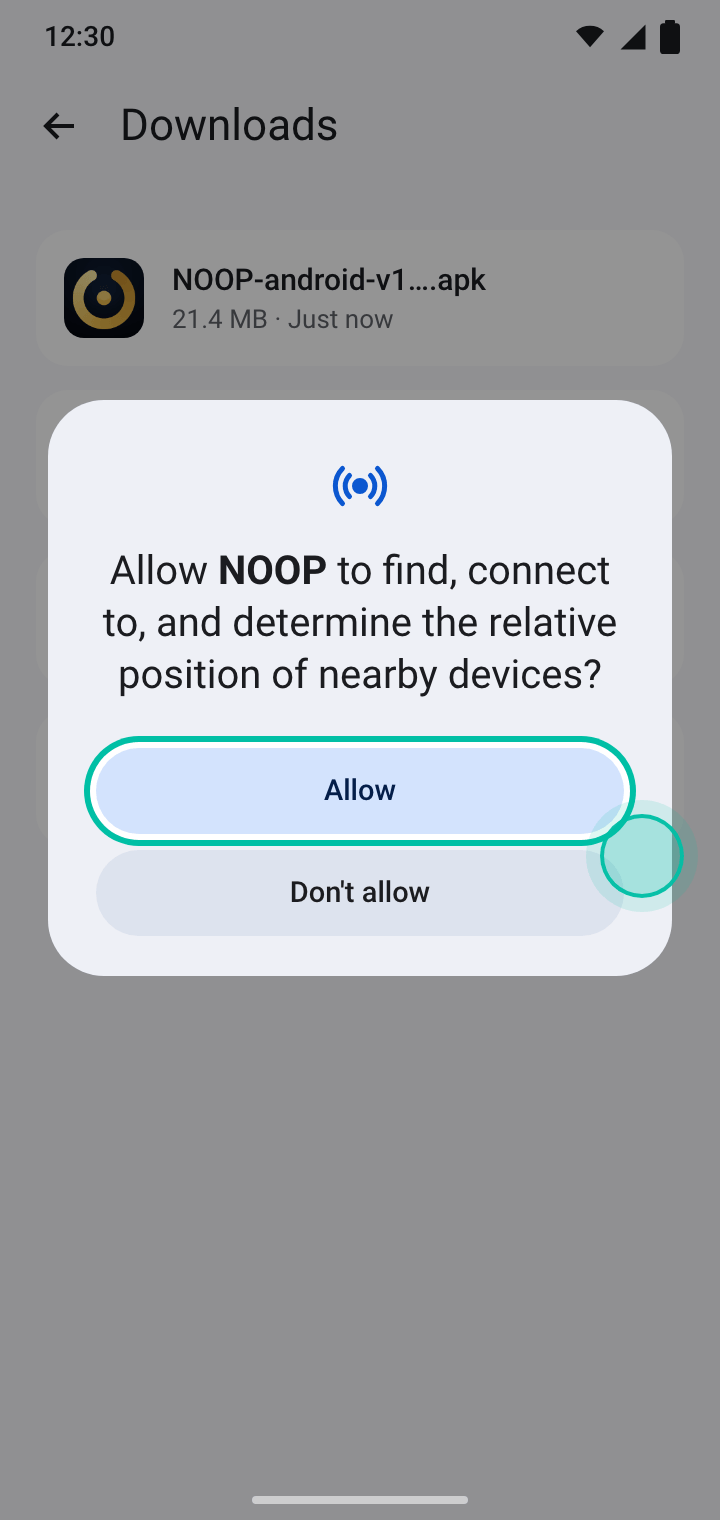
On Android 8 to 11 you'll be asked for Location instead, because those versions need it to scan for Bluetooth devices.
Allow notifications
NOOP keeps a quiet notification while it holds the Bluetooth link in the background, and uses notifications for wrist alerts like the smart alarm. When Android asks, tap Allow.
Pair your strap and finish setup
Put your strap on and follow the Find your strap step. When it says Bonded · streaming, tap Continue, fill in About you, and tap Enter NOOP. The pairing guide has the details, including the extra steps a WHOOP 5.0 or MG needs.
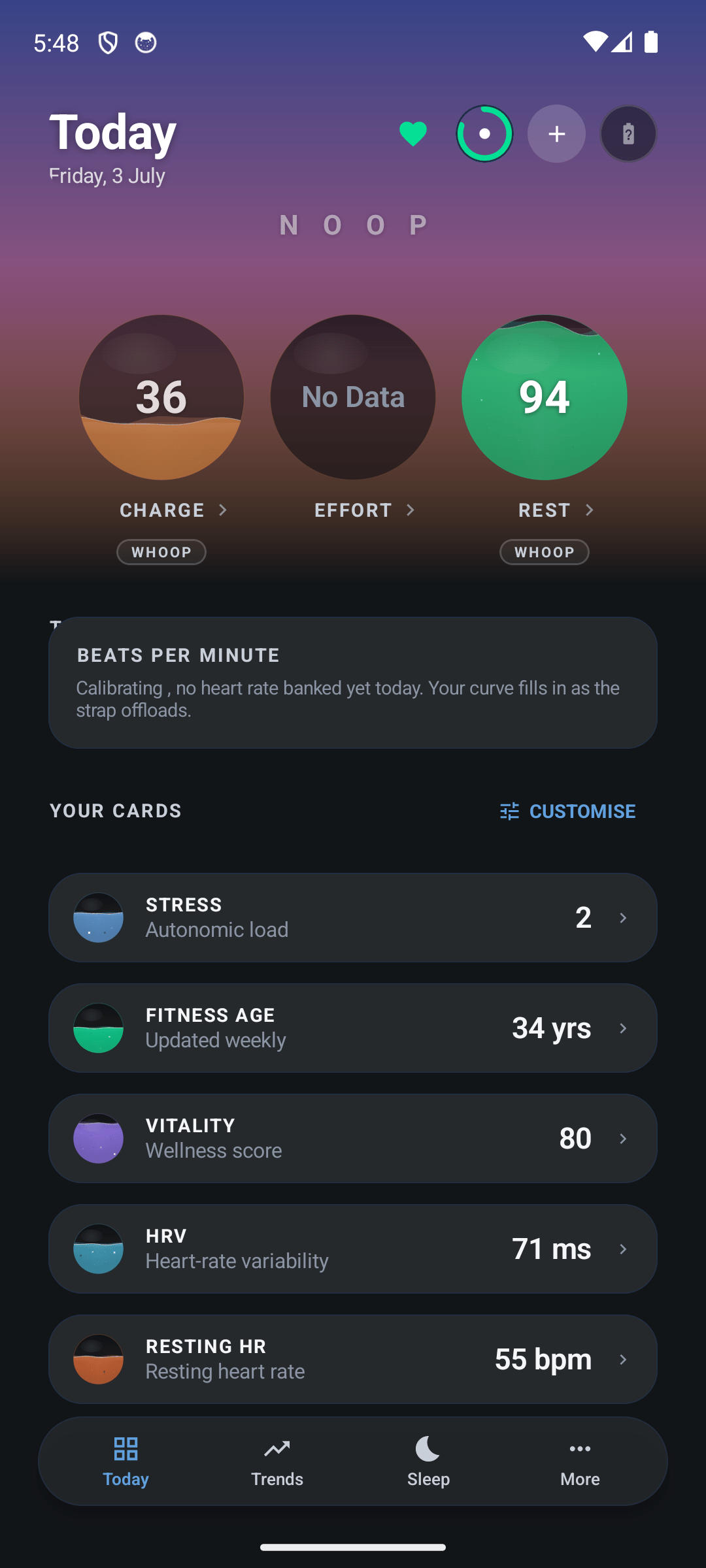
Keep NOOP running in the background
Android closes apps in the background to save battery. If it closes NOOP, you lose overnight sleep and recovery data. NOOP spots this and asks to be let off: when Android asks Stop optimising battery usage?, tap Allow.
If you skipped that, set it yourself:
- Most phones (Pixel and others): Settings → Apps → NOOP → App battery usage, then choose Unrestricted (or turn on Allow background usage).
- Samsung: do the above, then open Settings → Battery → Background usage limits and make sure NOOP isn't in Sleeping apps or Deep sleeping apps.
- Xiaomi, OnePlus, Oppo, Huawei and others: look for Autostart or App launch in Settings and allow NOOP. These brands name the setting differently; dontkillmyapp.com has the steps for each one.
How to update NOOP on Android
NOOP checks for new versions once a day and tells you when one is out. To update, download the new APK and install it the same way. It installs over the old version and keeps all your data.
If Android says App not installed because the package conflicts with an existing one, the copy on your phone was signed by someone else, such as a different fork of NOOP. Back up, uninstall that copy, then install the official APK.
Back up your NOOP data
Your data lives only on your phone. NOOP turns off Android's own cloud backup for privacy, so a new phone or an uninstall starts empty unless you've made a backup.
Open Backup & Sync in NOOP's menu:
- Choose a Backup folder and turn on Daily auto-backup to save a dated backup every day.
- To move to a new phone, copy a backup across, install NOOP there, and use Restore from a backup…
Backups aren't encrypted. If the folder syncs to Google Drive, Dropbox or similar, your health data goes there too, so only use a service you trust.
How to uninstall NOOP
Go to Settings → Apps → NOOP → Uninstall, or press and hold NOOP's icon and drag it to Uninstall. This deletes all of NOOP's data on the phone, so back up first if you might want it again.
To give your strap back to the official WHOOP app, pair it there again.
Android troubleshooting
| Problem | Fix |
|---|---|
| There was a problem parsing the package | The download didn't finish, or your Android is older than Android 8.0 or newer. Download the APK again. |
| App not installed | Free up some space, or remove an older NOOP signed by someone else (see updating). |
| The Install button doesn't respond | Turn off screen overlays such as blue-light filters or chat bubbles, then try again. |
| Play Protect blocks NOOP with no way past | Follow all three Play Protect fixes, and Samsung's Auto Blocker note. |
| NOOP misses nights or disconnects overnight | Let it run in the background. |
| NOOP can't find the strap | Allow Nearby devices in Settings → Apps → NOOP → Permissions, then see pairing problems. |
Frequently asked questions
Why does Play Protect say NOOP is unsafe?
Play Protect flags apps from developers it doesn't know. NOOP is published anonymously, outside the Play Store, so it isn't signed with a Play identity that Google recognises. The warning is about the missing signature, not about anything found in the app. NOOP's full source code is public on GitHub if you want to check it.
Is it safe to turn off Play Protect?
Only do it if you trust the app you're installing, and only for as long as it takes. Turn Scan apps with Play Protect back on as soon as NOOP is installed. Most phones never need this: More details → Install anyway is usually enough.
Which Android versions does NOOP support?
Android 8.0 (Oreo) and newer. On Android 8 to 11, NOOP asks for location permission, because those versions need it to scan for Bluetooth devices. On Android 12 and newer it asks for Nearby devices instead and doesn't use your location for Bluetooth.
Does NOOP work on Samsung, Pixel, OnePlus and Xiaomi phones?
Yes, on any phone with Bluetooth and Android 8.0 or newer. Brands that close background apps aggressively (Samsung, Xiaomi, OnePlus, Huawei and others) need one extra setting so NOOP can stay connected overnight. See Keep NOOP running in the background.
Will updating NOOP delete my data?
No. Installing a new APK over the old one keeps everything. Only uninstalling NOOP deletes its data, because NOOP keeps no cloud copy and Android's own backup doesn't include it. Make a backup first if you plan to uninstall.
Can I install NOOP on an Android tablet or a Chromebook?
An Android tablet with Bluetooth works like a phone. Chromebooks that run Android apps can install the APK too, but Bluetooth access for Android apps on ChromeOS is limited, so pairing a strap may not work.
Share this guide
Related guides
- 7 min readHow to pair your WHOOP strap with NOOPPair a WHOOP 4.0, 5.0 or MG strap with NOOP step by step: free it from the WHOOP app, use pairing mode, connect, and import your WHOOP history. Plus fixes for bond refused and missing data.Read the guide
- 5 min readNOOP not working? Fixes for every common problemNOOP won't install, won't pair, misses nights or shows Calibrating? Fixes for every common NOOP problem on Android, iPhone and Mac, plus how to report a bug with your strap log.Read the guide
- 7 min readHow to import your WHOOP data into NOOPGet your full WHOOP history into NOOP: request your WHOOP data export, import the zip, add Apple Health, Health Connect and nutrition data, and back up or move NOOP to a new phone.Read the guide
- 8 min readIs NOOP private? How NOOP handles your health dataIs the NOOP app private and safe? What stays on your device, the few cases where data can leave it, every permission explained, encryption, the AI Coach, and how to keep NOOP fully offline.Read the guide