 NOOP App Guide

NOOP gives three daily scores from 0 to 100. Charge is recovery, led by your heart-rate variability (HRV) against your own baseline. Effort is strain, built from the time your heart spends in each heart-rate zone. Rest is sleep, mostly how long you slept against what you need. All three are calculated on your device from published methods; they're NOOP's own estimates, not WHOOP's scores.
The three scores at a glance
| Score | Answers | Range | Used to be called |
|---|---|---|---|
| Charge | How recovered are you today? | 0 to 100 | Recovery |
| Effort | How hard did your heart work today? | 0 to 100 | Strain (0 to 21) |
| Rest | How restorative was your sleep? | 0 to 100 | Sleep Performance |
NOOP frames each day as an energy budget: you wake with Charge, spend it as Effort, and rebuild it with Rest.
Every score also carries a confidence label: Solid, Building or Calibrating. When there isn't enough data to calculate a score honestly, NOOP shows nothing rather than a made-up number.
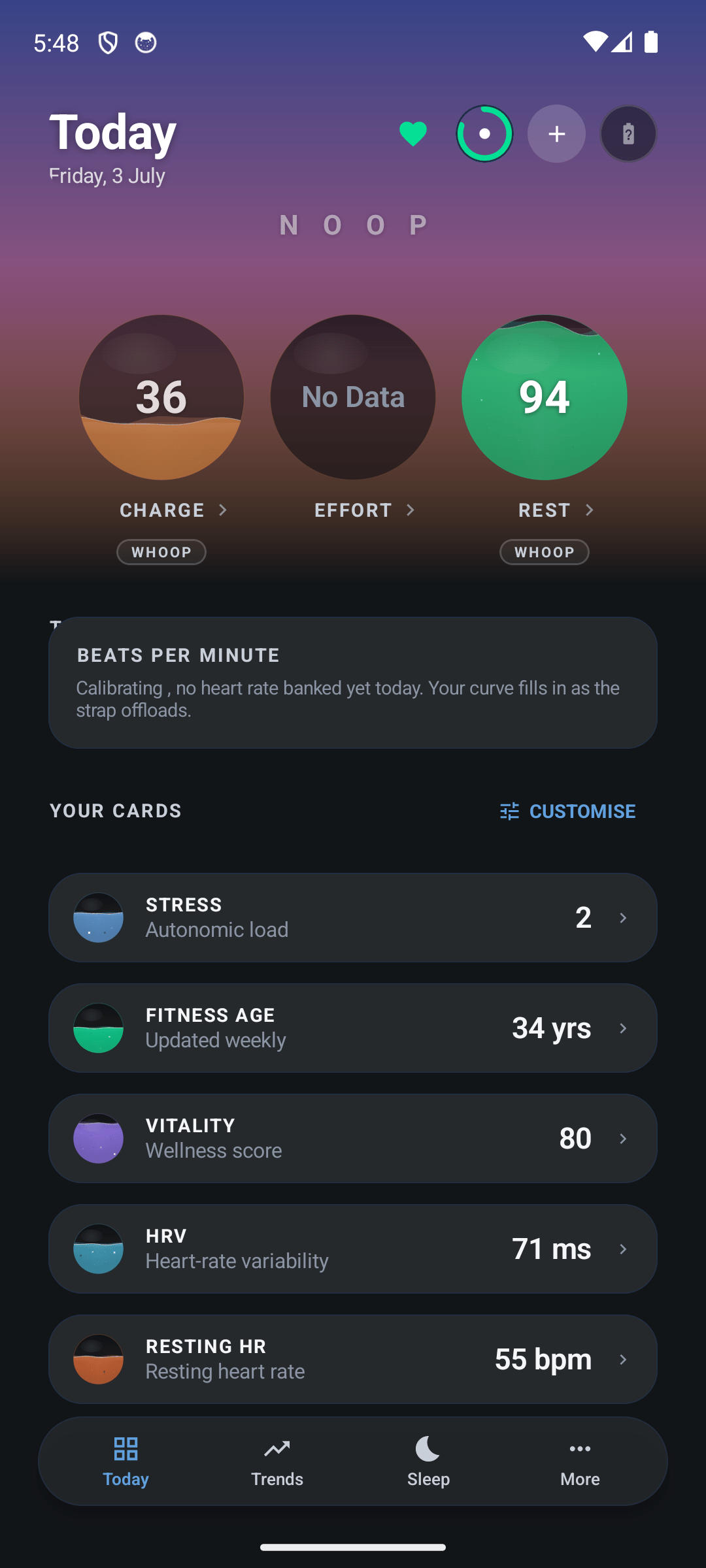
Charge, Effort and Rest sit at the top of NOOP's Today screen. Effort shows No Data until the day's heart rate has synced:
Charge: how recovered are you?
Charge compares last night with your own normal, not with other people. It blends five signals, each measured against your personal baseline:
| Signal | Effect | Weight |
|---|---|---|
| Heart-rate variability (HRV) | Higher than your normal → more Charge | 55% |
| Resting heart rate | Lower than your normal → more Charge | 20% |
| Last night's Rest | Better sleep → more Charge | 15% |
| Breathing rate | Lower than your normal → more Charge | 5% |
| Skin temperature | Further from your normal, either way → less Charge | 5% |
Each signal is turned into "how unusual is today for you", combined using those weights, and placed on a 0 to 100 curve. A completely average day for you lands around 58. Blood oxygen only counts when it's real (from an import), as a small penalty below about 95%; NOOP never invents it.
What the colours mean:
| Charge | Colour | Reading |
|---|---|---|
| 67 to 100 | Green | Well recovered, a good day to push |
| 34 to 66 | Yellow | Moderately recovered |
| 0 to 33 | Red | Under-recovered, take it easier |
Why Charge says "Calibrating"
HRV is the biggest part of Charge, and a "high" or "low" HRV only means something compared with your own normal. So NOOP learns your baseline first:
| Valid nights | Baseline status | What you see |
|---|---|---|
| Fewer than 4 | Calibrating | No Charge score yet |
| 4 to 13 | Provisional | A score, still settling |
| 14 or more | Trusted | A settled score |
| No new night for 14 days | Stale | The baseline needs fresh nights |
Tapping Recalibrate baseline throws away the nights already counted and starts again from zero, so don't tap it while you're waiting. To skip the wait, import your WHOOP export.
Effort: how hard did your heart work?
Effort measures the load on your heart across the whole day, from every second of heart rate:
- Heart-rate reserve. NOOP works out the gap between your resting and maximum heart rate (the Karvonen method), so effort is measured relative to your range.
- Zones. Each moment is placed in one of five zones, starting at 50, 60, 70, 80 and 90% of that reserve. Time in harder zones counts more, from 1× in the lowest to 5× in the highest.
- A log scale. The total goes on a curve from 0 to 100 where easy days sit low and each step up gets harder. 100 would mean the top zone held for a full 24 hours, so it's very rare.
Long walks still count: when your heart rate stays low but your steps or active calories are high, Effort gets a floor from that movement.
Your maximum heart rate is the highest NOOP has seen you reach (once it has enough data), or 208 − 0.7 × your age (the Tanaka formula), whichever is higher. You can override it in Settings → Profile.
Effort needs at least 10 minutes of heart rate for the day. It used to be on WHOOP's familiar 0 to 21 scale; when it moved to 0 to 100, the curve stayed the same, so an old 21 equals a new 100.
Rest: how restorative was your sleep?
Rest blends four parts of your night:
| Part | Weight | What it measures |
|---|---|---|
| Hours vs need | 50% | How long you slept against your personal sleep need |
| Efficiency | 20% | Time asleep compared with time in bed |
| Restorative sleep | 20% | The share of your sleep that was deep or REM |
| Consistency | 10% | How regular your sleep and wake times are |
Your sleep need starts at 8 hours and adjusts to your recent average.
Sleep debt
When you sleep less than you need, NOOP carries 55% of the shortfall into the next night's target, instead of adding up every lost minute forever. A debt under 10 minutes counts as balanced, and extra sleep never builds a "bank". The 55% figure was chosen by checking it against more than 850 nights of one person's WHOOP data, where it landed within 15 minutes of WHOOP's own sleep debt on 93% of nights.
How sleep stages are estimated
NOOP first decides when you were asleep from how still you were, then sorts each part of the night into awake, light, deep or REM from your heart rate, its variability and your breathing. The stages are approximate, like any wrist-worn tracker's. On a WHOOP 5.0 or MG they're rougher for now, because some of the overnight data is still being decoded.
HRV and resting heart rate
- HRV is the variation between heartbeats. NOOP calculates it as RMSSD, the standard measure from the 1996 Task Force guidelines, after cleaning out impossible and irregular beats. Higher than your normal usually means better recovered.
- Resting heart rate is the lowest steady level of your night: the lowest 5-minute average while you were in bed. That ignores single-beat dips but captures your true floor.
The WHOOP app's resting heart rate sits closer to your whole-night average, so NOOP's is usually 5 to 8 beats per minute lower. Neither is wrong; they measure different things.
Stress, Fitness Age and the illness warning
- Stress (0 to 3): compares today's resting heart rate and HRV with your own 30-day baseline. A higher resting heart rate and lower HRV push it up. Low, medium and high bands, with a plain-English reason.
- Fitness Age: a weekly comparison of your estimated fitness with the typical person, expressed in years. It uses the Nes 2011 fitness model (age, activity, waist size and resting heart rate). It isn't your body's "biological age".
- Illness early warning: compares your last two days with the four weeks before. When two or more signs appear together, such as resting heart rate up 5 bpm or more, HRV down 20% or more, skin temperature up 0.6 °C or more, or faster breathing, NOOP shows a heads-up. It needs 14 days of history.
Why NOOP's numbers differ from WHOOP's
- Different formulas. WHOOP's algorithms are private. NOOP aims at the same questions with published methods, so the scores usually move the same way but rarely match exactly.
- Different definitions. Resting heart rate is the clearest example (see above).
- Different baselines. Charge compares you with the baseline NOOP has learned, which starts fresh unless you import your history.
- Imported days win. For days covered by a WHOOP export, NOOP shows WHOOP's own values.
The science behind the scores
NOOP's calculations are based on published research, cited in its analytics documentation:
- HRV: Task Force of the European Society of Cardiology and NASPE (1996), the standard for measuring heart-rate variability.
- Heart-rate reserve: Karvonen (1957).
- Training load: Edwards (1993) and Banister (1991) "TRIMP" training-impulse methods.
- Maximum heart rate: Tanaka (2001), 208 − 0.7 × age.
- Fitness Age: Nes and colleagues (2011), the HUNT fitness study.
- Readiness signals: HRV-guided training (Plews, Buchheit) and training-load balance (Gabbett).
Frequently asked questions
What is a good Charge score in NOOP?
67 or higher is green, meaning you're well recovered compared with your own normal. 34 to 66 is yellow, and under 34 is red. Because Charge compares you with your own baseline, an average day lands around the high 50s.
Why does NOOP say Calibrating?
Charge needs at least four valid nights of HRV to learn your personal baseline, and shows Calibrating until then. Tapping Recalibrate baseline starts the count again, so don't tap it while you wait. Importing your WHOOP export gives NOOP your history straight away.
Is NOOP's Effort the same as WHOOP's Strain?
It answers the same question, how hard your heart worked, with a similar method, but it's NOOP's own calculation on a 0 to 100 scale instead of 0 to 21. Effort used to be 0 to 21 too; the curve stayed the same when the scale changed.
Why is my resting heart rate lower in NOOP than in WHOOP?
NOOP shows the lowest steady heart rate of your night (the lowest 5-minute average), while WHOOP's figure is closer to your whole-night average. A gap of 5 to 8 beats per minute is normal and nothing is wrong with your data.
Why is my HRV different from WHOOP's?
HRV is calculated from beat-to-beat intervals, and small differences in which beats are accepted change the number. A small gap is expected. A big one, around double, is worth reporting with your strap log.
Are NOOP's scores accurate?
They're estimates built on published sport-science methods and calculated on your device. They track direction well, but they aren't clinically validated, and NOOP doesn't claim to reproduce WHOOP's private formulas.
Do the scores work on a WHOOP 5.0 or MG?
Partly. Live heart rate works, so Effort can be calculated. The overnight data Charge and Rest rely on is still being decoded for the 5.0 and MG, so those scores can be missing or rough unless you import your WHOOP export.
Share this guide
Related guides
- 8 min readNOOP features: every screen explainedEverything the NOOP app can do: live heart rate, Charge, Effort and Rest, sleep stages, trends, Breathe, Intervals, insights, the AI Coach, Mac automations and more, explained screen by screen.Read the guide
- 7 min readHow to import your WHOOP data into NOOPGet your full WHOOP history into NOOP: request your WHOOP data export, import the zip, add Apple Health, Health Connect and nutrition data, and back up or move NOOP to a new phone.Read the guide
- 7 min readHow to pair your WHOOP strap with NOOPPair a WHOOP 4.0, 5.0 or MG strap with NOOP step by step: free it from the WHOOP app, use pairing mode, connect, and import your WHOOP history. Plus fixes for bond refused and missing data.Read the guide
- 8 min readNOOP FAQ: your questions, answeredAnswers to the most common questions about NOOP: what it is, whether it's free and safe, which straps and phones it supports, installing, pairing, privacy, scores and updates.Read the guide