 NOOP App Guide

NOOP shows live heart rate from your WHOOP strap, calculates Charge (recovery), Effort (strain) and Rest (sleep) scores on your device, tracks sleep stages and long-term trends, and adds extras like haptic breathing exercises, a silent interval timer, an illness early warning, an optional AI Coach and, on Mac, automations triggered by the strap. Most screens also work from imported WHOOP or Apple Health data alone.
What works with and without the strap
| Needs a paired strap | Works from imported data too |
|---|---|
| Live heart rate, Breathe and Intervals buzzes, smart alarm, wrist alerts, Mac automations | Today, Sleep, Trends, Explore, Compare, Insights, Workouts, Stress, Mind |
Most of NOOP works the moment you import an export. The strap adds the live layer: real-time heart rate, buzzes on your wrist and the physical double-tap.
Today
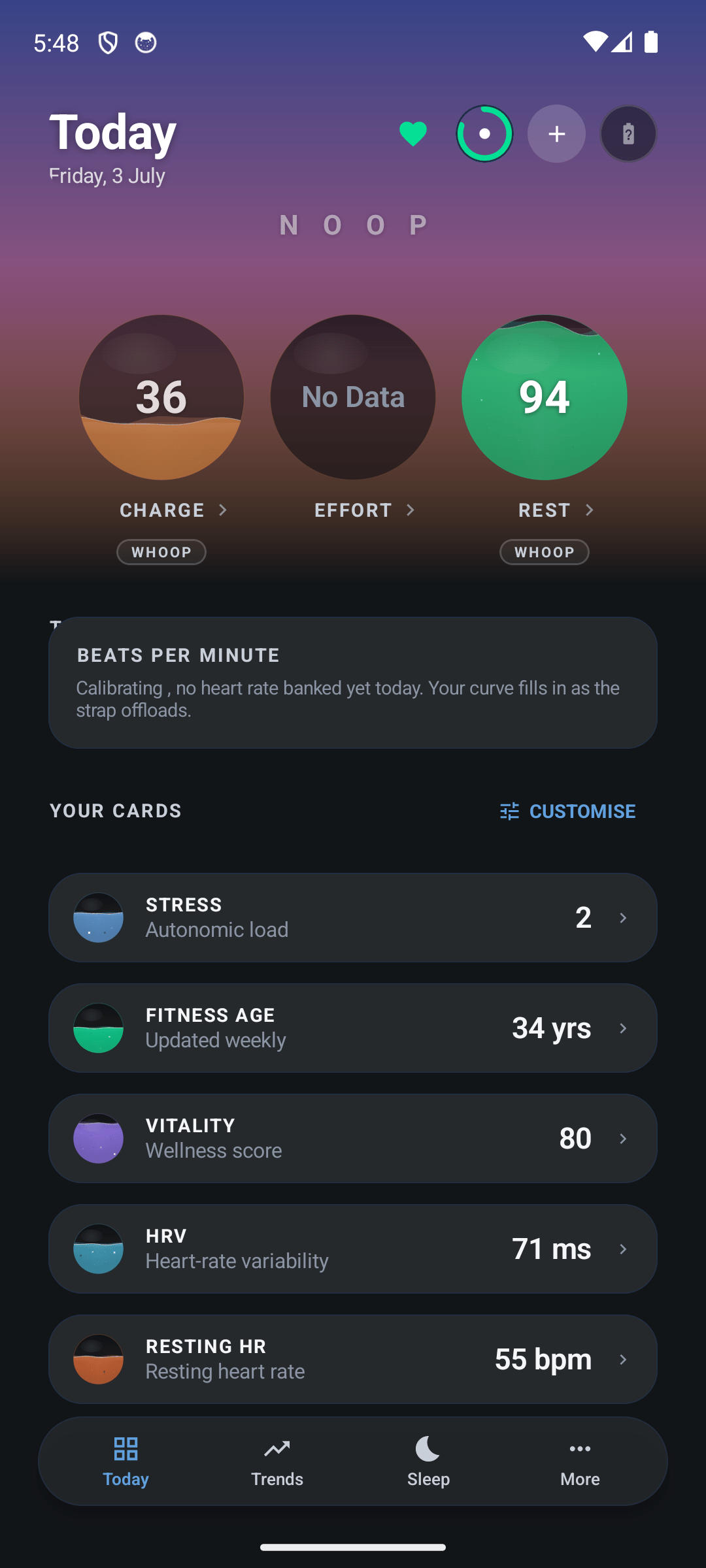
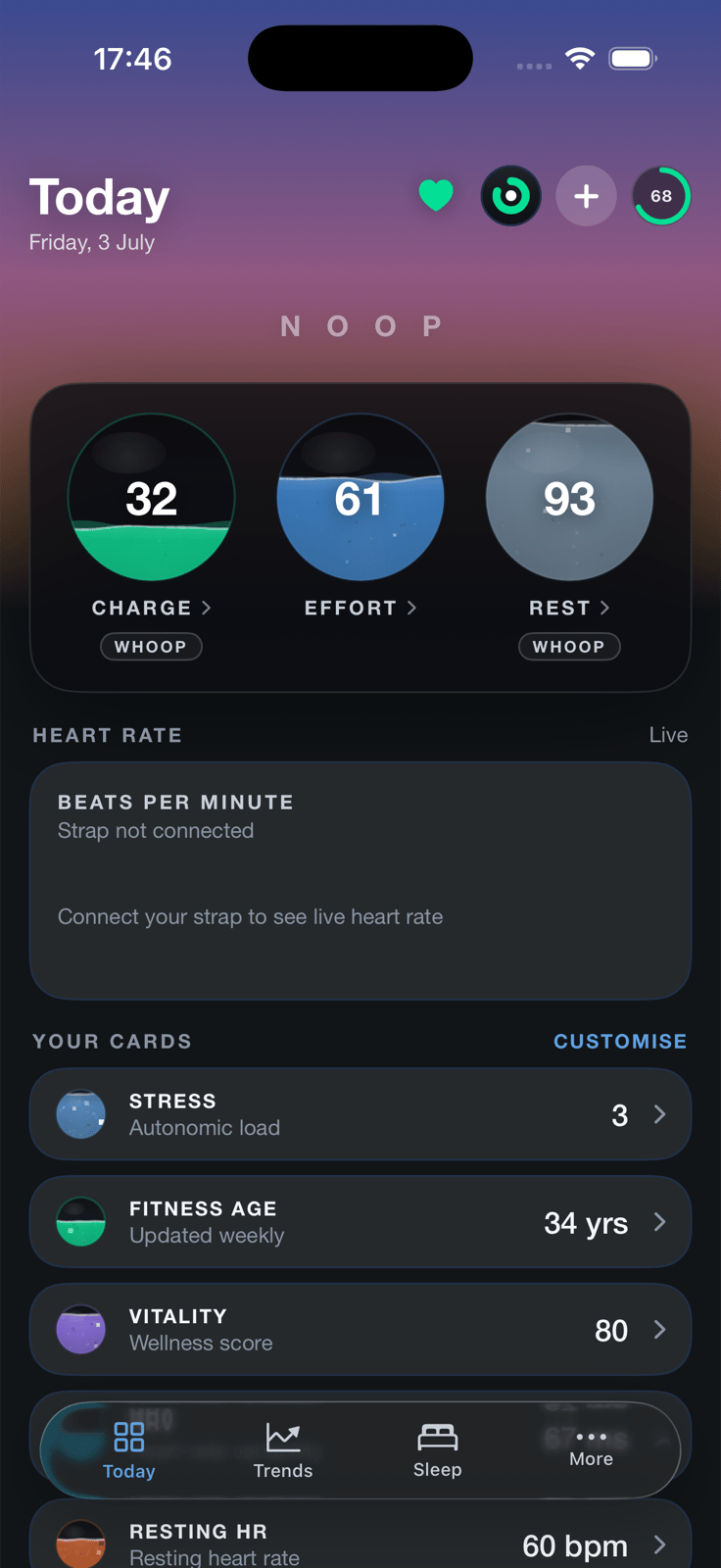
Your home screen. At the top are the three scores, Charge, Effort and Rest, drawn as rings or "liquid" vessels (your choice per device). Below them:
- A heart-rate card with today's curve, filling in as the strap syncs.
- Your cards: Stress, Fitness Age, Vitality, HRV, resting heart rate, blood oxygen, breathing, steps, weight and calories, each with a 14-day sparkline. Tap Customise to choose and reorder them.
- A health alert banner when the illness early warning is raised.
- Your recent workouts, and a footer showing where your data came from.
Each score explains itself: tap it for its trend and the inputs behind it. How the scores work goes deeper.
Live heart rate
The real-time screen, and the place to pair and check your strap:
- A big, smoothed heart rate: the middle value over about 10 seconds with spikes filtered out, so it doesn't jump around. Recent beat-to-beat (R-R) intervals sit underneath.
- The strap's battery, and the last data it sent.
- Scan & Connect, Buzz strap (a test buzz) and Disconnect controls.
A WHOOP 4.0 can also broadcast its heart rate as a standard Bluetooth heart-rate signal, so gym equipment or another app on your phone can read it live. It's off until you switch it on.
Sleep
Last night, readable in two seconds, and every night before it:
- A hypnogram of your night with time in awake, light, deep and REM, plus time in bed, efficiency, and when you fell asleep and woke up.
- Tiles for Rest, efficiency, consistency, hours vs need, restorative sleep, breathing and sleep debt, each with a sparkline and how it compares with your typical night.
- Stages vs typical: last night's deep, REM and light minutes against your own average.
- Step back through past nights to compare.
Trends, Explore and Compare
Three ways to look at your data over time:
- Trends: a Charge chart over a week, month, 3 or 6 months, a year or everything, with HRV, resting heart rate and Effort underneath, and a calendar heat strip of a whole year of Charge. It can also create a one-page PDF report for a doctor, coach or your own records.
- Explore: every metric NOOP has, one tap away. Each opens a chart with its average, low, high and change, plus what correlates with it in your own data.
- Compare: put two to four metrics on one chart and read how they move together, with a plain-English verdict like "When weight rises, Charge tends to fall".
Insights and Readiness
- Insights answers "what actually affects my recovery?". If you've imported WHOOP journal answers (alcohol, caffeine, late meals, meditation…), it compares your days with and without each one and shows how big the difference was. Activity cost learns what each kind of workout typically costs your next-morning recovery.
- Readiness gives one headline, Primed, Balanced, Strained or Run down, from your HRV and resting heart rate against your baseline, breathing at night, and your training load over recent weeks, with the reasons behind it.
Breathe
NOOP's most original feature. Because the strap both measures your heart-rate variability and buzzes, NOOP can pace your breathing with cues you feel, and show your HRV responding in real time.
- One buzz to breathe in, two to breathe out. Close your eyes; you don't need to watch the screen.
- Pick a pace: Relax 4-6, Coherence 5.5, Box breathing, 4-7-8 and a catalogue of other techniques, each with background and cautions.
- Sessions can run open-ended or for 5, 10 or 15 minutes.
- At the end you see your HRV before and after, so you can tell how much you settled.
Without a strap it still works as a visual guide.
Intervals
A silent HIIT timer. Set your work time, rest time and number of rounds, and the strap buzzes every change: three buzzes into work, one into rest, a 3-2-1 countdown at the end of each phase, and a long buzz when you're done. Train hands-free without looking at a screen. Without a strap it's a big visual timer.
Workouts
Your activity log from WHOOP, Apple Health and NOOP itself: totals for time, calories and distance, a breakdown by sport, and every session with its heart rate. Tap a session for its heart-rate curve, time in each zone and the Effort it added. NOOP can also suggest workouts it detected for you to confirm.
Health, Stress and Mind
- Health: live heart rate tinted by zone, plus your latest breathing rate, blood oxygen, resting heart rate, HRV and skin temperature, each marked in or out of your normal range.
- Stress: one number from 0 to 3 (low, medium or high) comparing today's resting heart rate and HRV with your 30-day baseline, with an explanation of how it's calculated.
- Mind: a quick daily mood check-in that NOOP lines up against your recovery, sleep and HRV, so you can see what moves your mood. It's a self-reflection log, not a mental-health assessment.
Illness early warning
NOOP watches for the pattern that often comes before you get ill. It compares your last two days with the four weeks before, and when two or more signs show up together (resting heart rate up, HRV down, skin temperature up, faster breathing), it shows a banner on Today and sends one notification that day. It needs 14 days of history. It's on by default on Android, opt-in on Mac (Automations → Illness early-warning), and it's informational only, not a diagnosis.
Smart alarm and notifications
- Smart alarm: sets the strap's own alarm, so it buzzes your wrist at your wake time even if your phone or Mac is asleep or NOOP is closed. With a connected Mac, an optional window can wake you during light sleep. On a WHOOP 5.0 or MG it's experimental, so keep a backup alarm.
- Wrist alerts (Android): buzz the strap when apps you choose notify you. NOOP only sees which app notified, never the message.
- Haptic coaching: heart-rate zone buzzes during exercise, and an optional nudge after you've been sitting still too long (off by default, respects quiet hours).
AI Coach (optional)
Ask about your data in plain language: "Why was my Charge low this week?" The Coach is off until you add your own AI provider: an Anthropic, OpenAI or Google Gemini key, or a model running on your own computer with Ollama or LM Studio. It sends your question and, only with your consent, short summaries of recent metrics. With a local model, nothing leaves your network. More on the Coach and privacy.
Mac extras: menu bar and automations
The Mac app adds:
- A menu-bar heart rate, tinted by zone, with a compact popover.
- Double-tap the strap to lock your Mac, mark a moment, or run any macOS Shortcut.
- Wear and presence: lock the Mac the moment you take the strap off, and run a Shortcut when you put it back on. (macOS only lets Apple Watch unlock a Mac, so NOOP can lock but not unlock.)
Data Sources, backups and settings
- Data Sources: import your WHOOP export, Apple Health, Health Connect and nutrition CSVs, and see the strap's status. Import guide.
- Backup & restore: export everything to one file, keep daily backups in a folder, or move to a new device.
- Settings: your profile (age, sex, height, weight, maximum heart rate), step calibration, metric or imperial units, light or dark appearance, strap controls, the update check, and What's new after each update.
- iPhone extras: Home and Lock Screen widgets, a Live Activity while the strap syncs, a Sync Strap Siri Shortcut, and Export for Shortcuts to send numbers to Apple Health.
- Languages: NOOP itself is available in English, German, French, Spanish, Italian, Polish, Portuguese, Russian and Chinese.
Frequently asked questions
Which NOOP features need the strap connected?
Live heart rate, the haptic buzzes in Breathe and Intervals, the smart alarm, wrist alerts and the Mac automations need a paired strap. Today, Sleep, Trends, Explore, Compare, Insights, Workouts and Stress also work from imported data alone.
Does NOOP have a smart alarm?
Yes. NOOP can set the strap's own alarm so it buzzes your wrist at your wake time, even if your phone or Mac is asleep or NOOP is closed. On a WHOOP 4.0 it uses the same command as the official app; on a 5.0 or MG it's experimental, so keep a backup alarm.
Is the AI Coach free?
The Coach itself is part of NOOP, but it needs an AI provider you set up yourself: your own Anthropic, OpenAI or Google Gemini key (which those companies may charge for), or a free model running on your own computer, such as Ollama or LM Studio.
Can NOOP make a report for my doctor or coach?
Yes. The Trends screen can create a one-page PDF report of recovery, sleep, HRV, resting heart rate and strain over a date range you choose. It's made on your device.
Does NOOP count steps?
On a WHOOP 5.0 or MG it estimates steps on the device. On a WHOOP 4.0 it can't read steps from the strap yet, so it shows steps imported from Apple Health or Health Connect.
Share this guide
Related guides
- 7 min readCharge, Effort and Rest: how NOOP's scores workWhat NOOP's Charge, Effort and Rest scores mean and exactly how they're calculated: HRV baselines, heart-rate zones, sleep need, why Charge says Calibrating, and why the numbers differ from WHOOP's.Read the guide
- 7 min readHow to pair your WHOOP strap with NOOPPair a WHOOP 4.0, 5.0 or MG strap with NOOP step by step: free it from the WHOOP app, use pairing mode, connect, and import your WHOOP history. Plus fixes for bond refused and missing data.Read the guide
- 8 min readIs NOOP private? How NOOP handles your health dataIs the NOOP app private and safe? What stays on your device, the few cases where data can leave it, every permission explained, encryption, the AI Coach, and how to keep NOOP fully offline.Read the guide
- 4 min readNOOP vs the WHOOP app: what's different?NOOP or the official WHOOP app? An honest comparison of price, privacy, accounts, scores, strap support and installation, who each one suits, and how to switch between them safely.Read the guide